
Orbitus Robotics
Orbitus robot films for Musimotion
Watch the updated spatial film wall and all 19 published source films. The gallery includes ROB’s 2019 workshop origins, the 2026 recycling and pouring sessions, and the Mare Island Maker Faire. Each player opens its complete source film from the Orbitus gallery. The home-workshop films have visual descriptions. The recycling, pouring and Maker Faire players also include English caption tracks.
Create a movie wall
In Musimotion, open New Presentation → Movie Walls and select a design. Robot Cutting Room sets two details beside a wide film. Robot Panorama Wall brings three screens from a wide row into close-ups. Robot Mission Triptych brings the pictures through the foreground on a diagonal.
Choose Create Presentation and press Play. The outdoor Maker Faire drive takes the foreground first, the indoor droid display follows, then ROB turns with a can in the workshop. Each screen approaches, fills the view and sweeps aside. The development templates play these complete 2026 films with an original electronic score.
To use complete films, select Use all 19 full Orbitus robot films (97 MB download) before creating the presentation. Keep the gallery open as the film count advances. Musimotion verifies the files and embeds them across seven scenes. The first scene uses the original full-height Maker Faire and torso-turn films. The next five pair the early workshop films with recycling or pouring footage. The closing scene plays the vertical recycling reel. If a download fails, reconnect and choose Create Presentation again.
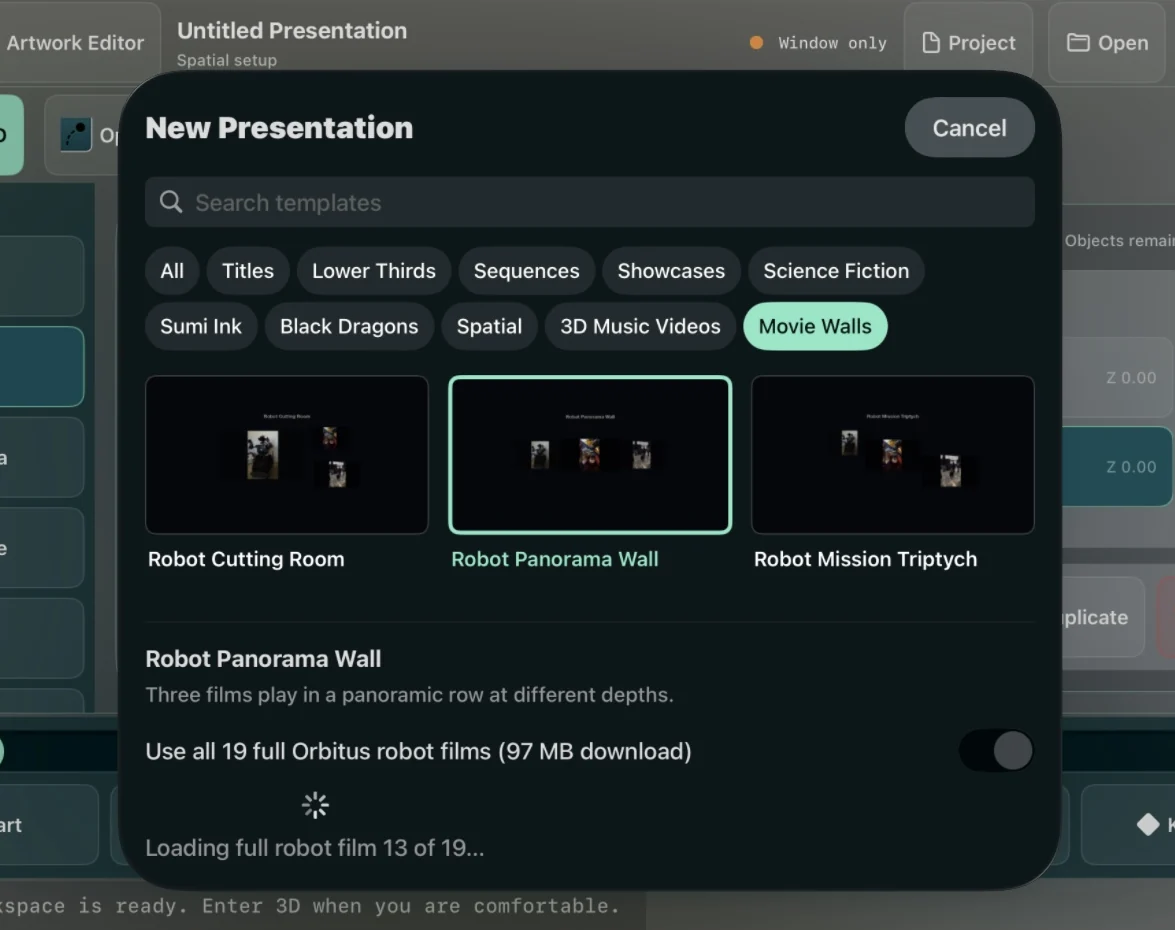
An actual Vision Pro simulator download using the public Orbitus films. The counter advances as the files are verified.
On Vision Pro, choose Open Volume to see the panels at different depths, or Full Immersion to enter the presentation. Use the player to pause and inspect the framing. On a Mac or iPad, open the same saved presentation. In Objects, select Maker Faire - Outdoor Drive, Maker Faire - Droid Hall or Workshop - Chassis Turn to edit that panel. The source movie, pan and zoom inside its frame, stage position, depth and scale belong to that layer.
Watch Robot Panorama Wall
The full 28-second presentation plays to the original 124 BPM score Across Mare Island. The film comes from Musimotion’s movie exporter. English captions describe the moving images. Open the MP4.
Movie dimensions, soundtrack and checksum.
Watch the 19 complete source films
Maker Faire
A lightsaber at Maker Faire 0:21
ROB holds a blue lightsaber upright near visitors and astromech droids inside the exhibition hall.
Open full film: A lightsaber at Maker FaireFrom the booth to the exhibition hall 0:12
ROB rolls along the outdoor aisle beside the Orbitus canopy toward the exhibition-hall doorway, accompanied by an operator.
Open full film: From the booth to the exhibition hallRecycling and pouring
Can recycling demonstration 0:33
ROB lifts and repositions a can and releases it above the recycling bucket.
Open full film: Can recycling demonstrationCan pickup 0:27
A close view of the can pickup sequence.
Open full film: Can pickupVertical recycling reel 0:22
The shorter vertical edit of the can-handling demonstration.
Open full film: Vertical recycling reelTorso turn with a can 0:18
The torso turns while ROB holds the can.
Open full film: Torso turn with a canCoke pouring demonstration 0:31
A supervised workshop demonstration of pouring from a can.
Open full film: Coke pouring demonstrationPouring practice 0:17
Workshop footage of the pouring practice sequence.
Open full film: Pouring practiceHolding through the turn 0:28
ROB turns its torso while holding a red Coke can, with its tracked base and open opposite gripper in view.
Open full film: Holding through the turnHome workshop
Raised arms in the workshop 0:03
R.O.B. stands on its tracked base with both articulated arms raised in a home workshop.
Open full film: Raised arms in the workshopHead movement with both arms raised 0:14
R.O.B. demonstrates head movement while holding both robotic arms raised beside its torso.
Open full film: Head movement with both arms raisedCamera-head rotation 0:09
R.O.B. rotates its camera head above a tracked base while its arms remain lifted.
Open full film: Camera-head rotationReaching with both arms 0:28
R.O.B. extends both multi-jointed arms outward and adjusts their position during a movement test.
Open full film: Reaching with both armsCoordinated arm movement 0:39
R.O.B. bends both arms inward through a coordinated sequence while facing the camera.
Open full film: Coordinated arm movementLoading the planter 0:39
A builder places a decorated planter box across R.O.B.'s arms and adjusts it into position.
Open full film: Loading the planterTurning while supporting the planter 0:18
R.O.B. supports a broad planter filled with green foliage while its camera head turns.
Open full film: Turning while supporting the planterHolding the planter steady 0:05
R.O.B. holds the planter steady before a person passes close in front of the camera.
Open full film: Holding the planter steadyCamera pan above the leaves 0:05
R.O.B.'s camera head pans above the foliage while the planter remains balanced across its arms.
Open full film: Camera pan above the leavesFront view behind the planter 0:07
R.O.B. faces forward behind a dense planter, with its head assembly visible above the leaves.
Open full film: Front view behind the planter