Direct tank drive
LR
- Left stick Y → left tread
- Right stick Y → right tread
- A or both shoulders → continuous dead-man
- Left/right index triggers → matching grippers
03 visionOS · spatial command · multi-camera H.264
R.O.B.'s spatial
control deck.
Operate R.O.B. from a native Apple Vision Pro cockpit with robot-confirmed drive control, three independently switchable camera feeds, an immersive live 360° sphere, voice, concurrent measured Amber arm control, and a safety contract that expires stale intent in 250 milliseconds.
01 Spatially composed cockpit
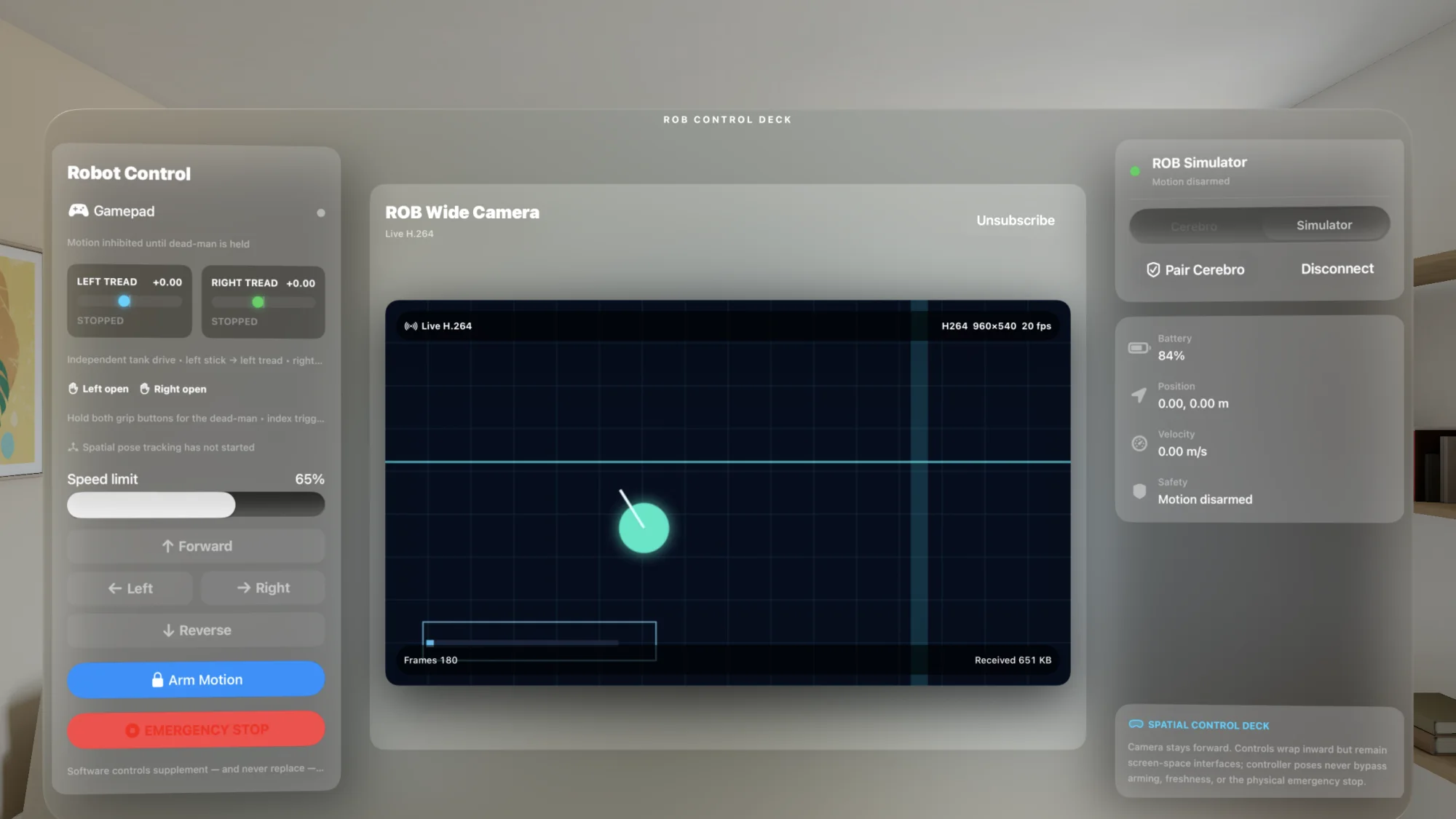
The 1,760×920 SwiftUI dashboard arranges three purpose-built panels around the forward video surface. The control and telemetry wings rotate eight degrees inward and sit 42 points forward in depth, creating a readable cockpit instead of a flat settings page.
The center prioritizes the camera. The left wing owns motion and stop state. The right wing owns connection, pairing, voice, telemetry, and the safety legend. The window explicitly claims focus for GameController events and stops/disconnects when it disappears.
Two presentation modes. The command deck remains a readable native window, while the stitched Insta360 feed can open either in a separate 2:1 panorama window or as a live RealityKit sphere inside an ImmersiveSpace. The product does not claim a volumetric robot, RealityKit arm model, Cartesian targets, or IK puppeteering.
02 Physical + spatial input
ROB's tank drive remains truly independent across every input path. The control domain may convert tread values to linear/angular form internally, but the Cerebro adapter reconstructs each side independently and clamps each to ±0.5 without cross-normalizing one tread against the other.
03 Head-relative embodiment
While the dead-man is held, the current Vision Pro head pose becomes a fresh neutral baseline. Device-anchor orientation is sampled every 40 ms. Relative yaw maps across a ±60° camera-neck range; relative pitch maps across ±35°. Yaw beyond the neck limit becomes a bounded request for the rotating torso, reaching full normalized travel at 180°.
04 Authenticated live video
ROBControllerVision authenticates control first, preserves Cerebro's exact live session UUID, then establishes a second domain-separated video connection. Main camera, belly camera, and Insta360 subscriptions can be enabled independently. A failed or congested camera path can remove one or every view, but it cannot delay motion, dead-man, or stop traffic.
Both services use TLS 1.3 and the exact pinned Cerebro leaf, but video has its own fresh reciprocal HMAC transcript so a control proof cannot be replayed against media. The subscription must carry the control connection's current UUID.
32-byte RVID frames wrap fixed 92-byte RBVD media headers, raw SPS/PPS, and complete AVCC access units. Annex-B, invalid dimensions, stream/session mismatch, length conflict, and malformed current-stream media fail closed.
Configuration is capped at 64 KiB and one access unit at 2 MiB. A sequence gap suppresses predictive frames and rate-limits a keyframe request. Exactly one configuration and one matching decodable keyframe may wait for UI activation.
AVSampleBufferVideoRenderer drives a display layer directly. Only throttled statistics reach SwiftUI every 500 ms, preventing per-frame network state from invalidating the entire interface.
The stitched 2:1 panorama can remain in a separate flat window or texture the inside of a live RealityKit sphere. Moving between the command deck, panorama window, and ImmersiveSpace preserves the authenticated subscription instead of dropping the robot session.
05 Voice command + puppet speech
The Vision Pro microphone and Apple Speech framework handle explicit authorization, current-locale recognition, live partial transcripts, and automatic final submission. On-device recognition is required whenever the selected recognizer supports it. Manual text entry always remains available.
Command mode sends bounded text into Cerebro's existing intelligence/command boundary. Puppet Speech asks R.O.B. to speak the phrase verbatim without passing it through the AI or motion parser. Neither mode can arm motion or bypass the stop contract.
1–1,024 characters · trimmed before transport
06 Supervised Amber arm control
The production rob-arm-control/2 path receives seven positions, velocities, currents, statuses, and verified modes for each arm. After drive is disarmed, the operator initializes each arm from fresh feedback and requests a separate time-limited Cerebro authority. Either or both arms can then run bounded measured joint targets without letting one side's lease or UI state impersonate the other.
07 Authenticated action approval
The operator must explicitly enable Cerebro Action Approval before the Vision app advertises availability. Immutable, expiring proposals appear only when addressed to this exact authenticated controller. The operator can approve, reject, cancel active work, and observe Cerebro-owned progress without giving a model direct access to arm targets.
play_gesture approval names an approved local Cerebro catalog entry. It never accepts model-supplied joint arrays; completion requires fresh Amber feedback to settle inside the measured tolerances.
A run_startup_test proposal appears only after Cerebro separately arms one fixed measured two-arm workflow. Approve is the final exclusion-zone and E-stop checkpoint; R.O.B. gives an audible warning before motion.
Scene loss, disconnect, the software E-stop, or disabling the console withdraws availability and cancels a pending proposal. Approved work keeps explicit cancel-and-hold and measured terminal states.
08 Safety by freshness
Motion starts inhibited. The app must be connected, explicitly armed, active, receiving current input, continuously satisfying the dead-man, and confirmed by R.O.B. as the current drive controller. RobotSession reevaluates the decision every 100 ms; physical input is reread every 50 ms and expires after 250 ms.
The red control is a latched software stop. It sends a braked/stopped snapshot and releases authority; resetting it leaves motion disarmed. It supplements—and never claims to trigger, reset, or replace—the physical robot's independently wired emergency stop.
09 Full offline simulator
The built-in simulator creates a fresh session, integrates differential motion, drains an 84% starting battery, publishes telemetry every 200 ms, and enforces its own 350 ms receiver watchdog. Its animated BGRA grid and robot marker go through VideoToolbox H.264 compression, the bounded newest-frame channel, SPS/PPS generation, the same receiver validator, sample-buffer reconstruction, and the same AVFoundation display surface as production video.
10 Swift 6 architecture
ROBControlCore is a pure-Foundation, transport-independent domain package. ROBCerebroTransport contains Network, Security, CryptoKit, Bonjour, Keychain, TLS, HMAC, and the narrow compatibility adapter. ROBVideoPipeline owns Core Video, VideoToolbox, Core Media, and AVFoundation. The package has no third-party dependencies.
Implementation status
Native three-panel cockpit; Simulator and Cerebro endpoints; robot-confirmed drive authority; independent treads and grippers; gamepad, PSVR Sense, screen, and head-relative input; voice and puppet speech; independently switchable main, belly, and Insta360 H.264 feeds; flat panorama and live immersive sphere; protocol-v2 measured control of both Amber arms; action and startup approval; safety latch and 250 ms lease.
PSVR Sense six-DoF poses require visionOS 26. Physical arm motion requires fresh measured feedback, verified position mode, independent Cerebro authority, current calibration, and real hardware validation. Tracked poses are diagnostic data; they are not converted into Cartesian targets or IK. Real Cerebro base battery/pose mapping is not yet populated.
No local Gemini, MLX, Core ML, object recognition, navigation autonomy, depth/stereo/spatial-video recording, or replay. The immersive feature is specifically a live equirectangular video sphere—not a reconstructed room, volumetric robot, collision model, or RealityKit arm.
Orbitus Robotics · built on the physical platform
R.O.B.'s applications are designed around real cameras, real networks, real actuators, and the discipline required to put intelligent behavior near a moving machine.