RedAgent 0.5.1 development preview · November 20, 2026
Choose a radio, verify its channel, then capture
Fill the BSSID and channel for a passive Wi-Fi audit. RedAgent first checks capture access, then verifies that the selected radio is actually on the requested channel before it records a packet.
Implemented and tested in development source 6d0b04e. The public November 11 pilot installer remains version 0.4.0 and predates these controls.
1. Load the access points
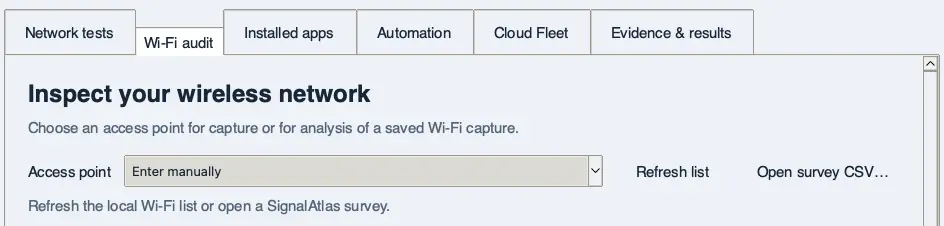
Open Wi-Fi audit and leave Test mode on Capture only. Click Refresh list to read the Wi-Fi data available to this computer. On macOS, allow Location access if prompted, then refresh again. Windows uses its Wi-Fi list. Linux uses NetworkManager’s cached list.
To use a saved SignalAtlas observations CSV, choose Open survey CSV…. This also works offline. You can follow the screenshots with the synthetic practice survey.
The access-point controls are above the audit fields. Select any screenshot to view it at full size.
2. Select the radio
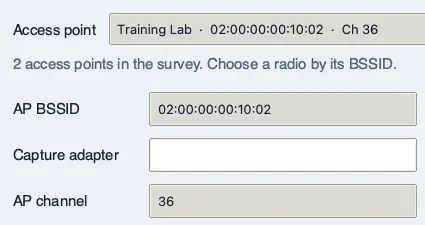
Open Access point. Choose the row with the BSSID you want. In the practice survey, both rows are named Training Lab. Choosing the address ending in 10:02 fills AP BSSID with 02:00:00:00:10:02 and AP channel with 36.
The two fields come from the same observation. A missing channel stays blank.
For a passive capture, enter the local Capture adapter separately. For an existing capture, choose Analyze saved Wi-Fi capture… to use the selected BSSID. Selecting a row starts neither operation.
3. Recover an empty list or use manual entry
If the local list is empty, check that Wi-Fi is on and the OS permits Wi-Fi identity access, then click Refresh list. If a survey has no usable Wi-Fi BSSIDs, open another file or choose Enter manually and type the BSSID.
Loading an empty survey clears the previous radio selection and restores the manual fields.
Enter manually restores the BSSID and channel you entered before choosing from the list. Reconnect modes also use manual values. The local password-candidate action is available with manual entry.
4. Check capture access before a test
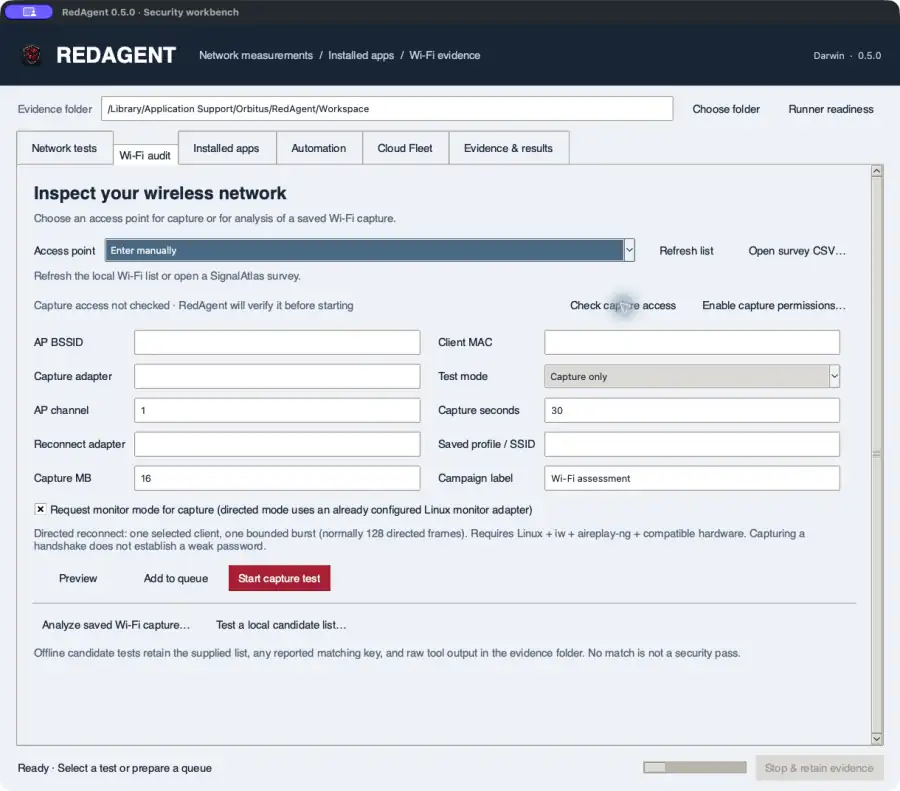
Enter the local Capture adapter, then click Check capture access. The check runs in the persistent helper—the same account that owns the eventual job. It enumerates interfaces and checks the platform’s native permission mechanism. It does not attach an adapter or record packets.
Actual macOS development UI from the 0.5 capture-access workflow. Start here before selecting Start capture test; version 0.5.1 adds the channel gate described below.
Expected result: the line changes to Ready or Action required with a platform-specific explanation. If action is required, starting a capture saves capture-readiness.json, reports permission-required, and does not launch dumpcap or a reconnect operation.
5. macOS: hand permission setup to Installer
macOS uses Berkeley Packet Filter devices. RedAgent opens and immediately closes one unbound /dev/bpf* descriptor to verify the helper account; it attaches no interface and captures no traffic.
If the result says Install Wireshark ChmodBPF, click Enable capture permissions….
RedAgent will open Wireshark ChmodBPF 4.6.9 only when the package matches SHA-256 24fa242bffa57754b00afa17ea310989bff2a73efe59995fd0b86498ebd80b64.
Complete the administrator prompt in macOS Installer. RedAgent does not receive or store the administrator password.
Restart the Mac, reopen RedAgent, and click Check capture access again. An installer receipt alone is not proof that the helper account can open BPF.
6. Linux and Windows use their own mechanisms
The process is not the same on each operating system. RedAgent detects the platform and reports a separate recovery path.
Ubuntu, Kali, and other Linux desktops
Checks that dumpcap is installed, can enumerate interfaces, and that the active account has the distribution-managed wireshark capture group or dumpcap has both cap_net_raw and cap_net_admin. After a group change, sign out and back in before checking again.
Windows 11
Checks that dumpcap is installed, the Npcap service (or legacy NPF service) exists and is running, and the selected adapter appears in dumpcap. Missing dumpcap, missing Npcap, a stopped driver, and a missing adapter have distinct results.
Use the operating system’s normal Wireshark or package-manager setup to repair these prerequisites. RedAgent does not silently change Linux capabilities, run sudo, download Npcap, or install a Windows kernel driver.
7. Verify the requested channel
Turn on Request monitor mode and verify the AP channel before capture and provide the AP channel. RedAgent records the current channel, requests the chosen channel, reads the channel back, and only then starts dumpcap. If it changed a dedicated capture radio, it also attempts to restore the original channel after the bounded test.
Channel is not network identity: two access points—including an AT&T gateway and another nearby network—can both use channel 52. Keep the selected BSSID filter; it identifies the specific radio. In the United States, channel 52 is a DFS channel, so hardware and drivers must also follow the applicable regulatory rules.
macOS
RedAgent asks CoreWLAN to tune the selected interface and verifies the reported channel. If macOS rejects the change or reports another channel, the state is channel-required and capture never starts. On the tested Mac mini, en1 remained on channel 40 when channel 52 was requested.
Linux
Use a dedicated monitor interface. RedAgent uses iw to request and verify the channel, then restores the original channel when possible. It fails closed if the interface is not in monitor mode or the read-back does not match.
Windows
RedAgent verifies the current channel reported by netsh wlan show interfaces. Portable Npcap does not provide a reliable cross-adapter channel-switch API, so a mismatch stops before capture instead of pretending the switch succeeded.
The saved channel-preparation.json records the requested, original, and verified channels plus the platform result. A separate channel-restoration.json records restoration when a change was made.
8. Read the packet evidence boundary
Ready only means the helper account can see the selected interface through the platform permission path at check time. Channel verified only means the radio reported the requested channel. Neither proves that relevant frames were received.
RedAgent 0.5.1 counts packet records in the saved pcap or pcapng. A structurally valid capture containing zero packets is completed-no-packets, with radio visibility explicitly not established. An invalid capture is capture-invalid. Keep capture-readiness.json, channel-preparation.json, the capture file, and stderr.bin together when diagnosing an adapter or driver limitation.